Linux--Hexo中添加本地搜索
Hexo中添加本地搜索
今天增加了一个新功能,博客文章检索。记得之前尝试过,觉得很麻烦,并且文章也少。但现在文章多起来。下面简单记录下过程
安装搜索插件
这个需要在hexo根目录执行,目前这个插件相比几年前的search插件更稳定。
1 | npm install hexo-generator-searchdb --save |
配置文件
打开Hexo根目录下的”_config.yml”文件,在文件末尾添加以下配置:
1 | # 本地搜索数据生成配置 |
主题里的config.yml
主题开启本地搜索
1 | search: |
测试调试
配置完成后,需要清理缓存并重新生成静态文件,
1 | hexo clean |
在/public目录下也能找到该文件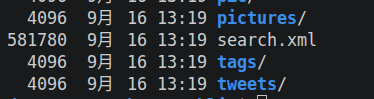
同时,浏览器访问localhost:4000/search.xml会看到检索表。
若提示Cannot GET /search.xml,代表文件没有生成,需要重新校对以上步骤。
效果如下:
感觉还行哦,还算流畅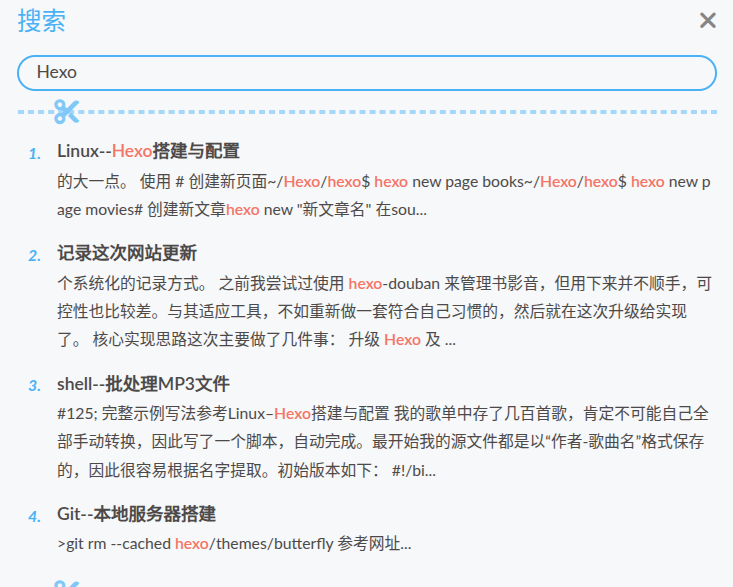
相关推荐

2026-10-19
Linux系统--rustDesk安装
rustDesk使用rustDesk 是一款开源的远程桌面工具。 下载下载最新的安装包 客户端下载下载地址 服务端下载下载地址 服务端安装在服务器上,客户端根据系统需要安装。我服务端使用的是ubuntu,需要下载两个包,分别是rustdesk-server-hbbr_1.1.16_amd64.deb和rustdesk-server-hbbr_1.1.16_amd64.deb 安装1、桌面创建一个目录,比如rustDesk,把安装包放入其中,右键打开终端。 12345678# 如果无桌面可执行mkdir rustDesk cd rustDeskwget https://github.com/rustdesk/rustdesk-server/releases/download/1.1.16/rustdesk-server-hbbs_1.1.16_amd64.deb wget https://github.com/rustdesk/rustdesk-server/releases/download/1.1.16/rustdesk-server-hbbr_1.1.16_amd64...
2025-06-16
Linux--安装英伟达驱动
Linux 安装 英伟达驱动Centos7安装驱动1、禁用 nouveau驱动 12345# 创建配置文件添加内容sudo vim /etc/modprobe.d/blacklist-nouveau.confblacklist nouveauoptions nouveau modeset=0 2、备份镜像 12345678# 备份镜像sudo mv /boot/initramfs-$(uname -r).img /boot/initramfs-$(uname -r).img.bak#建立新的镜像sudo dracut /boot/initramfs-$(uname -r).img $(uname -r)#重启reboot 3、下载安装驱动一般为NVIDIA-Linux-x86_64-xxx.run 1234sudo chmod +x NVIDIA-Linux-x86_64-xxx.runsudo sh NVIDIA-Linux-x86_64-440.44.run -no-x-check -no-nouveau-check -no-opengl-files 4、其他(若安装成...

2024-04-07
Linux工具--busctl使用
busctl 命令使用busctl 命令简介busctl 是一个用于 introspect 和 monitor D-Bus 总线的命令行工具。它提供了一组命令,可以用于查看总线上的对等体、监视消息交换、显示对象树、调用方法等操作。 busctl 命令的基本用法 list:显示总线上的所有对等体。 status:显示总线服务的进程信息和凭证。 monitor:监视消息交换。 capture:类似于 monitor,但将输出写入 pcapng 格式的文件。 tree:显示一个或多个服务的对象树。 introspect:显示指定对象的接口、方法、属性和信号。 call:调用方法并显示响应。 emit:发出信号。 get-property:检索一个或多个对象属性的当前值。 set-property:设置对象属性的当前值。 help:显示命令语法帮助。 busctl命令的示例用法busctl call: 12# 调用 org.freedesktop.systemd1.Unit 的 Restart 方法busctl call org.freedesktop.systemd1 /org/fr...

2024-12-11
Linux服务器--storcli使用
StorCLI 工具使用StorCLI 是用于管理和配置 RAID 控制器的命令行工具,支持 Broadcom(原 LSI)的 MegaRAID 和 SAS RAID 控制器。通过 StorCLI,用户可以查看控制器状态、管理虚拟驱动器和物理驱动器、执行固件更新等操作。 安装和运行下载StorCLI 可以从 Broadcom 的官网获取。下载适合您操作系统的版本(Linux、Windows 等)。 安装Linux: 下载后解压 .zip 文件,进入解压目录,运行: 12sudo cp storcli64 /usr/local/bin/sudo chmod +x /usr/local/bin/storcli64 Windows: 双击安装包,根据提示完成安装。 检查版本运行以下命令确认 StorCLI 安装成功: 1storcli64 -v 基本用法 查看控制器信息列出系统中的所有 RAID 控制器: 1storcli64 show 查看详细信息查看某个控制器的详细信息(假设编号为 0): 12storcli64 /c0 show 查看虚拟驱动器(VD) 1sto...

2025-08-14
Linux--docker使用
Linux下 Docker 工具使用Docker 基本介绍Docker 是一个开源的应用容器引擎,可以让开发者将应用及其依赖打包到一个轻量级、可移植的容器中,然后在任何支持 Docker 的 Linux 主机上快速运行。它的最大优势在于环境隔离和可移植性,尤其适用于开发、测试和部署的全流程。 Docker 与虚拟机的区别 对比项 虚拟机 Docker 启动速度 分钟级 秒级 占用资源 较高(需要完整OS) 较低(共享宿主机内核) 隔离性 完全隔离 进程级隔离 可移植性 一般 极高 部署复杂度 较复杂 简单 Docker 的核心概念镜像(Image):应用及运行环境的只读模板。 容器(Container):镜像运行时的实例,可读可写。 仓库(Registry):存放镜像的地方(如 Docker Hub、阿里云镜像仓库)。 Linux 下安装 Docker以 Ubuntu 为例: 更新软件包 1sudo apt update 安装必要依赖 1sudo apt install apt-transport-https ca-certificates ...
2024-02-29
Linux--upower机制和使用
UPower机制什么是UPowerUPower是一个用于管理电源的工具,它是Linux桌面环境中的一个组件,负责处理电源管理相关的任务。UPower提供了守护进程、API和一组命令行工具,用于获取系统中关于电池、电源适配器等电源设备的信息,并提供相关的控制功能。 通过UPower,用户可以查询电源设备的状态、剩余电量、是否正在充电等信息。此外,UPower还可以监控电源设备的状态变化,例如当电源适配器被插入或拔出时,UPower会相应地更新电源状态信息。 UPower使用 upower –help查看帮助信息 --enumerate 枚举设备的对象路径123456-d, --dump 转储所有对象的所有参数-w, --wakeups 获取唤醒数据-m, --monitor 监视来自电源守护程序的活动--monitor-detail 详细监控-i, --show-info 显示对象路径信息-v, --version 打印客户端和守护程序的版本 upower -e查看当前电池相关的设备 12345# upower -e/org/freedesktop/UPower/devic...
评论